Insurance
Overview
The Insurance page tracks which insurance plans an employee has elected and eliminates the need to update individual employee deduction amounts whenever there is a change in plan premiums. The system can calculate employee deductions amounts directly from the setup information on this page.
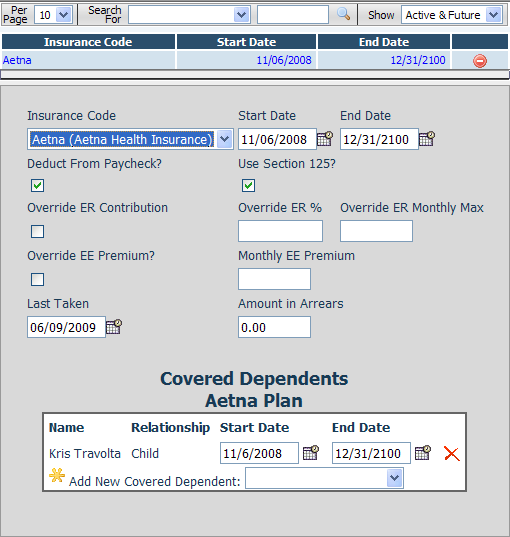
Fields
• Insurance Code – The type of plan the employee has elected.
• Start Date – The date that the employee insurance coverage begins.
• End Date – The date that the employee insurance coverage ends.
• Deduction From Paycheck? – Indicates if this insurance item should create a deduction from the employee’s paychecks.
• Use Section 125? – Indicates if the paycheck deduction should be taken on a pre-tax basis.
• Override ER Contribution – To override the premium defined in the company insurance setup you can check this box and enter amounts in the Override ER% and Override ER Monthly Max Fields.
• Override ER % - The override percentage of the employees contribution for this insurance plan for this employee.
• Override ER Monthly Max – The override maximum amount of the employer portion paid into this insurance plan on behalf of the employee.
• Override EE Premium – To override the employee’s premium defined in the company insurance setup check this box and enter the override Monthly EE Premium in the box provided.
• Monthly EE Premium – The override monthly employee premium for this insurance plan.
• Last Taken – Shows the date that this insurance item was applied to an employee paycheck.
• Amount In Arrears – The total amount of accumulated premiums that were scheduled to come out of the employee’s paychecks that could not be deducted because of shortages.